
Release Notes
See below for a summary of all Dash releases from 2026 onwards. Dash version numbers are structured using the year, school term, school week, and release number.
Version Key:26.1.1.0= Year 2026, Term 1, Week 1, Release 0
If you have any questions regarding Dash or our software releases, please contact [email protected].
Happy browsing!
Regards,
Dash Team
dashapp.com.au
Dash Release – 26.4.5.0
10th November, 2026
Development and Features
- New custom question sections and matrix question type
- Product export, including variation stock
- Addition of Competition Quick Start feature
- Continued progress on Pathways functionality
Bug Fixes
- Small update to single sign-on onboarding terms
- Update to how single-level admin access applies to schools
Featured
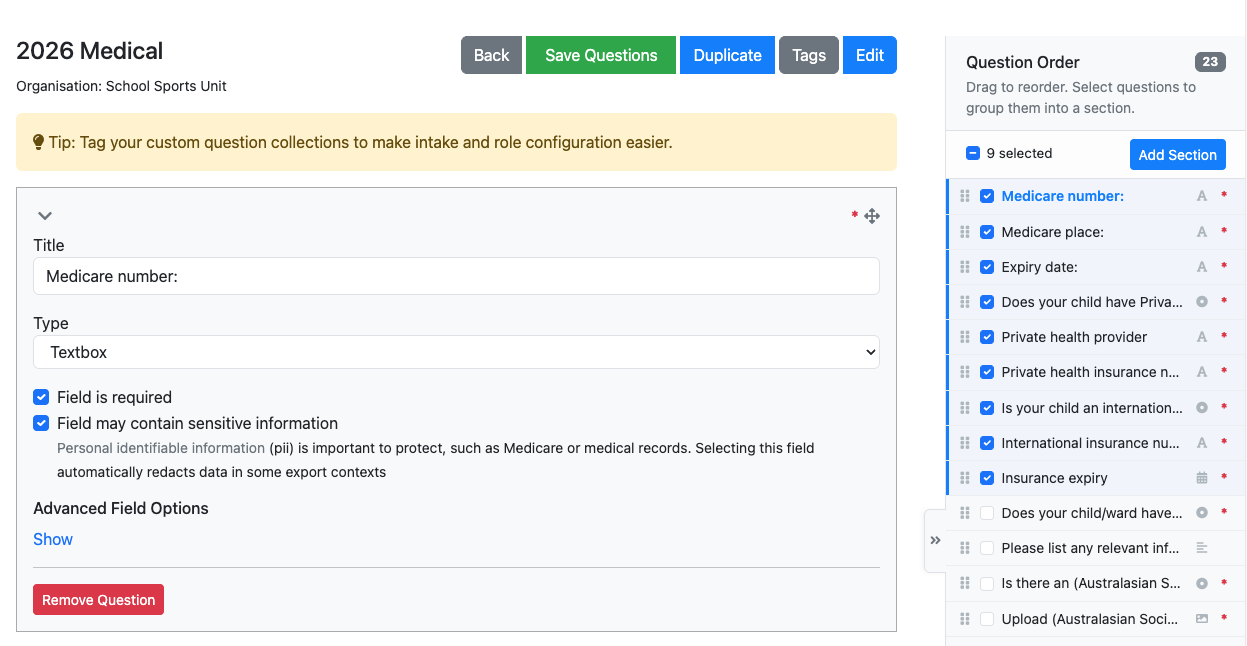
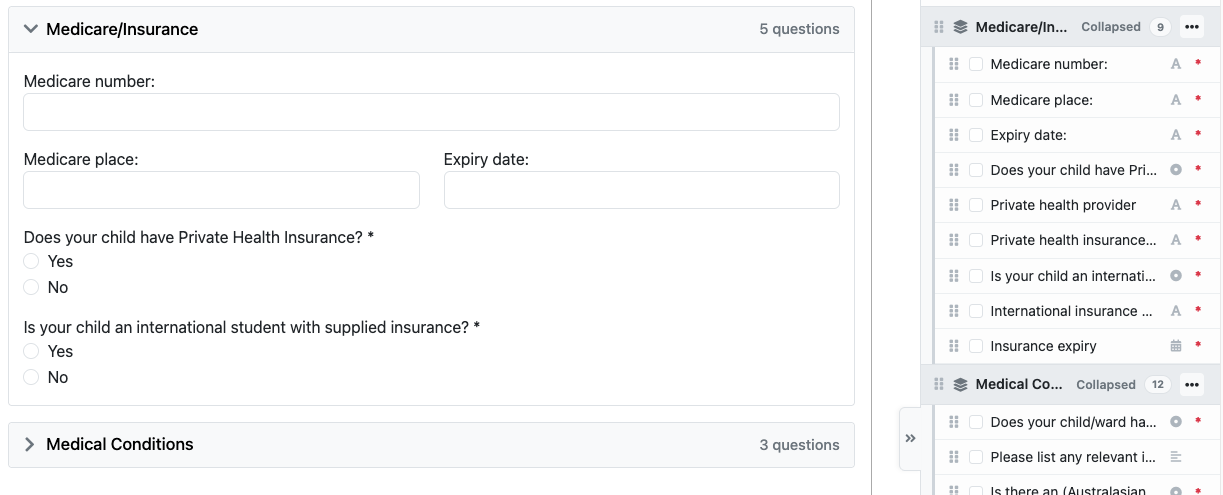
Custom Question Sections
Custom question collections can now be grouped into individual collapsible sections, and these sections can be easily reordered via a new right-hand side menu.
Each section is a heading on the form, with the questions that belong under it. A section can start collapsed, so a long form opens as a short list of headings instead of every question at once. Questions are dragged into a section, and the menu on the right is where you rename a section, reorder the form, or remove a section without losing the questions inside it.
Custom Question Sections may be useful for:
- Breaking a long application form into clear groups
- Keeping optional or later questions tucked away until someone opens that section
- Rearranging a form without rebuilding the questions
Sections are added while editing a custom question collection. A new advanced question type of Matrix has also been added which allows you to build dynamic tables for appliers to answer.
Please contact [email protected] if you would like a hand updating your existing collections.
Dash Release – 26.4.4.0
3rd November, 2026
Development and Features
- Allow a workflow step to progress applicants into an intake
- Role tenure mail merges can now include the applicant’s school name
- Organisation invoice settings can include due date (26.4.4.1)
- Optional extra message on the external supplier link step (26.4.4.3)
- Continued progress on Pathways (26.4.4.1/2/3)
Bug Fixes
- Edit workflow step logic
- Single sign-on refinements
- Small update to school selection modal
Dash Release – 26.4.3.3
30th October, 2026
Development and Features
- Order item exports now include the product SKU
- Payment records store the applicant’s school
- SSWS Program Matrix updates
Bug Fixes
- Continued security patches
Dash Release – 26.4.3.2
28th October, 2026
Development and Features
- Lifecycle states can use a display name that differs by intake type
- Nominator and nomination custom questions shown in the intake state update modal
- Continued progress on Pathways functionality
Bug Fixes
- Voided products no longer appear on exports
- Resolved an issue with inconsistent interop admin roles
- Nominations are blocked while an intake is still in draft
- Initiatives can no longer be changed once an instance is active
Dash Release – 26.4.3.0
26th October, 2026
Development and Features
- Shadow intake configuration and improvements
- A preview of the role info pack is available when awarding a tenure
- Continued progress on Pathways functionality (26.4.3.4)
- Ongoing platform maintenance (26.4.3.1)
Bug Fixes
- Nomination rules updated, including actionless nominations
- Resolved an error for schools with no region
- Time values can be entered as hours and minutes
Dash Release – 26.4.2.0
21st October, 2026
Development and Features
- External supplier step can store a link and password
- Intake admin questions can prefill answers when an intake is created
- Role tenure manage screen, with summary and appointment tabs
- Initiatives keep a stable key, and sports and initiatives are available in Pathways
- Continued progress on Pathways functionality
- Draft intakes are hidden from applicant-facing lists
- Ongoing platform maintenance and security updates
- Further security patches (26.4.2.1)
Bug Fixes
- Resolved a 500 error on Pathways outputs
- Clearer MFA recovery codes
- Clearer rejection when single sign-on onboarding cannot continue
- Resolved a clash when interop checked remote objects
Dash Release – 26.4.1.0
16th October, 2026
Development and Features
- Introduce intake lifecycle states
- Admin notes can be appended on an intake
- Pathways support for roles, role types and workflow decisions
- Offline payment macro can dynamically reconcile the total amount owing
- Single sign-on onboarding checks, including mobile number and duplicate accounts\
- Continued work on the School Swimming matrix
- Continued progress on Pathways functionality
Bug Fixes
- Child team links are no longer shortened
- External supplier link shows a preview
- Step numbers update correctly when steps change
- Pathways catalogue bug (26.4.1.1)
Dash Release – 26.3.12.0
8th October, 2026
Development and Features
- School and organisation endorsement on the endorsement step
- Sensitive intake configuration
- Single sign-on onboarding, including mobile prefill
- Levy quantities can be limited by a question response
- Transfer obligations and balance status for payments
- Continued progress on Pathways functionality
Bug Fixes
- Custom question answers that must be distinct are validated correctly
- Continued security patches
Dash Release – 26.3.11.0
1st October, 2026
Development and Features
- Organisation positions
- Support for postponing an event
- Continued progress on Pathways functionality
Bug Fixes
- Event reservation form no longer loses its answers
- Competition import opens correctly
- External link step continues without a manual refresh
Dash Release – 26.3.10.0
25th September, 2026
Development and Features
- Continued progress on Pathways functionality
- Separate sector endorsement for primary and secondary
Bug Fixes
- Ongoing platform maintenance and dependency updates
- Improve teacher/admin team management feature
Dash Release – 26.3.8.0
11th September, 2026
Development and Features
- Continued progress on Pathways functionality
Bug Fixes
- Improvements to custom question collection UX
- Prevent mandatory titles for information steps
- Fix issue with competition progressors
Dash Release – 26.3.7.0
2nd September, 2026
Development and Features
- Continued security patches
Bug Fixes
- Resolved bug preventing schools from adding general unavailability to program applications
- Allow attachments to send across Dash instances via interop
- Various validation errors in roles and tenures
Dash Release – 26.3.6.0
27th August, 2026
Development and Features
- Addition of a new advertised close date field for intakes
- Updates to child team admin interface
- Refinement of embedded Stripe field in payment step
Dash Release – 26.3.5.0
24th August, 2026
Development and Features
- Implementation of new Manage Order Items modal
- New field on roles for “Affiliated Region”, which allows endorsement and other workflows to be more accurately assigned
- Continued work on external supplier step
Featured
Manage Order Items
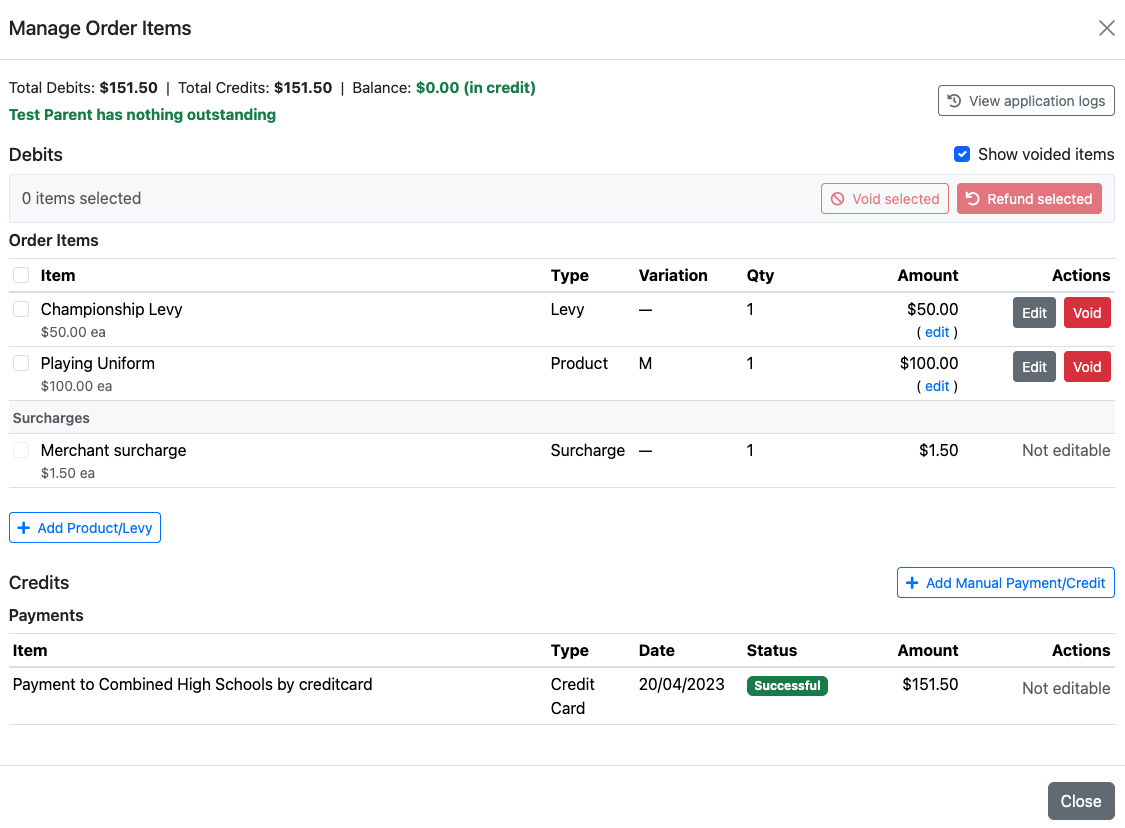
Admins can now review and adjust an application’s products, levies and payments from a single screen; including editing quantities, amounts and variations, adding or voiding items, recording an offline payment, and issuing a refund.
This new screen shows the application’s current debits (products, levies and other charges), credits (payments and refunds) and running balance. Voiding a line removes it from the balance but does not return any money. If a payment has already been received, a refund can be issued separately against the selected debit items.
Refunds are currently recorded as an offline credit, which the association settles themselves (for example by EFT). Online card refunds via Stripe are coming soon. Fully refunded items can be voided so they are removed from the balance once the refund is recorded.
Manage Order Items may be useful for:
- Correcting a product quantity or variation after an application has been submitted
- Removing unpaid products or levies that are no longer required
- Recording an offline payment (EFT, cash or credit) against a specific application
- Refunding selected items after a withdrawal, injury or incorrect intake
- Reviewing the full debit and credit history on an application
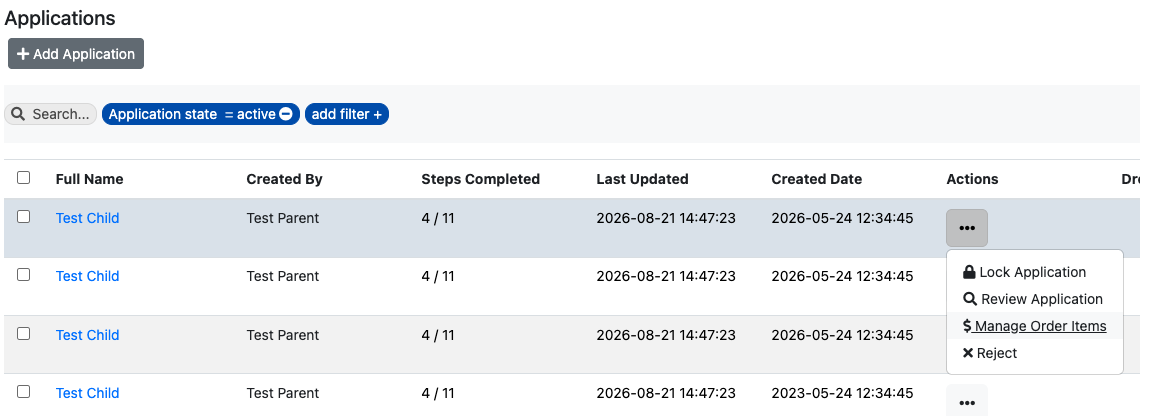
Manage Order Items can be opened from an application profile using the Manage Order Items button (admins only).
Please contact [email protected] if you would like assistance using this feature, or would like to discuss how it may assist with your association’s payment and refund processes.
Dash Release – 26.3.4.0
17th August, 2026
Development and Features
- Add support for additional intakes on regions
- Add dedicated External Supplier step
- Ongoing platform maintenance and dependency updates
- Continued development and refinement of Pathways
Bug Fixes
- Fix cache issues when a child record is edited
- Resolve issues affecting shadow intake applications
Dash Release – 26.3.2.0
31st July, 2026
Development and Features
- Add support for viewing ‘payment method selected’ and ‘payment method used’ on application exports
- Add support for bounce actions within Pathways
- Add tool allowing admins to aggregate application balances at the user level
- Continued development and refinement of School Swimming Dash instance
Bug Fixes
- Updates and fixes for custom mail merge templates
- Resolve issues affecting the media archiver
Dash Release – 26.2.13.0
17th July, 2026
Development and Features
- Continued work on new application process for SSWS
- Allow credit card payment option to be suppressed for specific intakes (also prevents third party payments)
- Add foundational support for third-party step completions via webhook
Dash Release – 26.2.12.0
10th July, 2026
Development and Features
- Allow native Stripe integration/embedding on payment step
- Continued work on automated fee splitting feature and Event Dashboard
- Add dynamic text and formatting options to information step type
- Continued development and refinement of Pathways
- Addition of global criteria for has any medical needs
- Ongoing platform maintenance and dependency updates
Bug Fixes
- Resolve issue with large data sets not filtering on flag correctly
Dash Release – 26.2.11.0
3rd July, 2026
Development and Features
- Continued refinements to Preferences step in preparation for new SSWS delivery season
- Introductory works on dedicated Event Dashboard
- Continued work on automated fee splitting feature
Dash Release – 26.2.9.0
19th June, 2026
Development and Features
- Continued progress on Single Sign-On (SSO) access controls
- Introduce new dynamic blocks feature for intake group dashboard
- Begin configuration for new SSWS delivery season
- Small UI improvements (26.2.9.2)
- Introduce network error helper (as opposed to infinite loading wheel) (26.2.9.2)
- Continued development and refinement of Pathways (26.2.9.2 + 26.2.9.4)
- Backend monitoring and security improvements (26.2.9.2 + 26.2.9.3)
- Begin development on automated fee splitting feature (26.2.9.4)
Bug Fixes
- Fixed an issue where certain media files would fail to download correctly